All You Need To Know About Website Builders

Website builders are among the best ways for regular people to easily design as well as build their own sites without writing any code. There is no actual requirement of technical knowledge for the people, whether you are an entrepreneur or simply a hobbyist to create a website.

So, what exactly are website builders? Let’s look into it.

A website builder is a way to build your own website all by yourself. Gone is the time where you have to manually write HTML code to develop a website. Dreamweaver used to be the pioneer when it comes to building a website. But times have changed. People don’t have any inclination to learn how to code in order to build a website from scratch. Most of them don’t have enough money to hire a professional in order to do so. Current website builders now exist to fill this vast gap and provides the flexibility of code without writing any code. There are more about the freedom from building the website from scratch and they focus more on the bigger picture. They provide templates and allow you to customize them as per your requirements easily. In case you wish to add any basic details, then you can leave it there and you can continue to make changes later on. You are provided with the ability to change everything. All of this can be done online. You don’t have to download any website building software in order to make the website on your computer. You simply have to visit the website, log in, and manage your website from there. They can easily take care of all the related technical stuff such as hosting, domain name etc. in case you want them to. Control and convenience is the basic foundation of website builders. They allow you to easily get a fully functional site up and running without wasting any time. You can make a website within a few hours. Most of the website builders offer tutorial videos to help you in doing so.

The main value of website builders is to allow you to focus on function and design of the website. They tend to come in one of the two forms: generated, and drag and drop.

The Drag and Drop builders actually do as you say. You can easily position all the elements of the page wherever you want them to be and whichever style that you wish. A generated website will ask you a series of questions and then move on to building a website based on the answers that you provide. You can easily customize the results as well as add or remove different elements but most of them are a more structured experience. In the backend, these website builders also help you in SEO or search engine optimization which gives your website to get the best chance possible in order to rank well on search engines like Google. Most of them offer analytics which allows you to easily see how many people are actually visiting your website, what exactly they are doing and where they are mostly coming from.

Available Website Builders.

There are a plethora of website builders which are coming in the market and few of them are that good that you expect them to be. As the market tends to grow, most of them will offer better services. But the main question lies that what good website builders are currently present.

It actually depends on the wants and requirement of you. There isn’t any one-size-fits-all website builder. It can’t simply exist. There are too many different variables which are involved. However, there is a selection of best website builders which can meet your demands.

We wanted to provide you with an opinion on this particular question so we conducted in-depth research to find out the best website builders. The user experience tests are duly collated with different features, pricing, support and we have made a list of easiest website builders that you can use.

Keeping this in mind, the following website builders are meant for people who don’t have any coding background. These website builders are certainly quite easy to use and provide good support as well as intuitive interfaces. However, they don’t provide a lot of backend control like their advanced brethren but in case you wish to make your website without any hassle than these are the best suited for you.

Wix

Wix is considered to be the best drag and drop and easy website builder present in the market. It offers extensive complete control over the look of your website. You can position any element like logo by simply dragging it and dropping at the place you want. In case you wish to add text, you can also do that with the same process. The interface can be quite overwhelming during the initial period, but once you get hold of it, then Wix is among the easiest website builders to use.  For those who are new to designing of websites and wish to learn then it is the best available option. It offers you the freedom to learn basic principles of web design like what to put on the navigation bar, how to present the homepage etc. We have found that Wix has the complete combination of ease of use as well as customer support that is currently peerless. Whether it is novice or professional, one can easily use it. We think it is the best options for the people who are new to web design. It allows you to create simple websites.

GoDaddy

In our testing, it performed really well. It provides a much detailed and guided building experience and they do it by simply in a way which is easy to follow as well as intuitive. To get any small as well as polished website from scratch, there isn’t any website builder than GoDaddy. It provides domain registration along with hosting too.

Now, let’s move on to more advanced website builders.

Squarespace

It is a mysterious, suave and a bit pretentious website builder. It is among the most stylish platform at present and the backend is quite sophisticated to handle huge and high-demand website like online magazines. It is rightly renowned for the wide range of quality templates, all of which are completely optimized to work well on both mobile phones and desktops.

Shopify

It was launched in 2006 and it has seen an exponential rise in the recent years. As more people are getting into selling products on the internet, they require somewhere to sell them. That’s where Shopify made its mark. It is quite an effective e-commerce website builder which provide a great framework to set up an online store.

Limitations of Website Builders

Website builders aren’t as perfect as they seem. There are different weaknesses you should know along with their strengths. Websites are quite a serious business and you wouldn’t like to saddle yourself by choosing the wrong platform. Mentioned below are the potential drawbacks and limitations of website builders.

Customization Limits

Few website builders can be a bit restrictive when it comes down to customizing the website. It is the price which you have to pay for the convenience and the structure. Drag and drop builders like Wix strive to provide you with as much control as they can possibly offer, but they have their own limitations. For getting unique functionality and presentation, there is no alternative to HTML and CSS to create a website.

Shared Hosting

Your website needs a place to be stored in order to allow people to access it anytime and from anywhere. This is called hosting. Most of the website builders provide this, but in case your website is sharing different resources with other websites in the system then it is called shared hosting. It is not an issue for smaller websites but as they are scaled up then it can become a risk. Websites on shared hosting generally have the risk of slower loading speeds and even complete outage in case there is more number of people visiting the website than the maximum limit.

Lack of Backup

With the exception of IM Creator and Weebly, website builders often don’t allow you to back up your website. This makes it quite difficult to move the website from one platform to another. Website builders wish to keep their customers once they have got them and this is why they don’t allow them to take backup.

Most of you might never face these problems. There are small limitations but it is required to being clear about website websites to know their exact drawbacks. Most of the website builders offer freemium services or free trial which provides you the ample time to easily weigh them before spending any money.

Conclusion

Website development has undergone a massive transformation over the years. It is no longer restricted to web developers who use to have the monopoly on web designing. Website builders have offered the chance for everyone to build their online presence by making functional and stylish websites. You can easily push out any website in a matter of hours in case you really want to, however, we recommend that you take more time.

There is a wide range of excellent website builders, but we can’t say for sure which is the best website builder. It all depends on your actual requirements and needs. In case ease of use is most important to you then you can go ahead and sign up for a free trial of any website builder that you like such as Wix or GoDaddy. In case you wish to develop your technical knowledge while building a website then you should go forward to use Squarespace which is recommended by us. Just try them out.

3 Ways to Increase Customer Retention Through Your Marketing Strategy

Getting customers can be easy at times, but keeping them is another thing. However, in order to run a business, it’s key that you have consistent income as that’s one of the only ways that you can plan ahead, expand, and enjoy continued success. As great as getting new customers is, keeping old ones is just as essential. There are numerous ways that you can keep customers coming back time and time again, and many require an approach that centers on the customer and their needs. There are also ways that you can use your marketing strategy to help ensure customers stick around. On that note, you’re going to find three ways how you can increase customer retention through your marketing strategy below.

5 simple solution to edit PDF (How to edit PDF with ease)?

In case you’re always submitting or sharing PDF files via email or over the web finding the best solution to edit PDF and send a perfect document can be confusing with so many choices. PDF is a digital, portable yet short document format allowing anyone to send files others can read no matter the type of software, hardware or gadget used to view the document.  To adapt photos and text to your PDF viewing device modification and editing might be needed, which isn’t that easy in PDF.  However, the good news is it can be done.  Windows to Mac users can modify graphics and texts in PDF format wherever they’re through a number of tools.  Here are the best simple solutions to edit PDF.

How to Edit a PDF with PDFelement

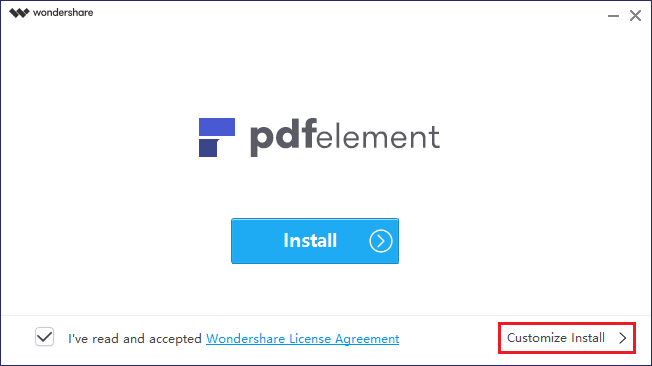
While your default PDF tools might not be able to make changes in the PDF, you can do so with PDFelement. It is a lightweight, robust Adobe Acrobat Alternative. Whether you want to read, edit, annotate, create, convert, protect or OCR PDFs, PDFelement has it all. The app feels capable, stable and surprisingly easy to use. When we first reviewed PDFelement, we were delighted by how well it achieved a balance between cost, ease of use, and a comprehensive feature set. Now let’s see How to edit a pdf using PDFelement with ease.

Editing a PDF with PDFelement

  • Open the target PDF using PDFelement.
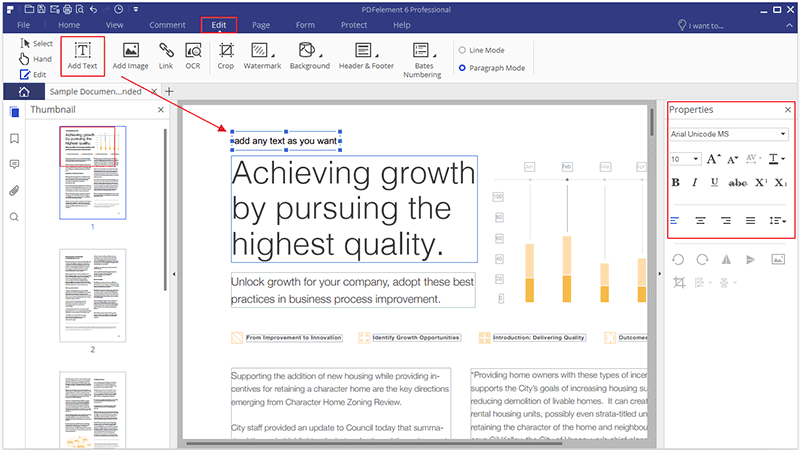
  • Start editing text and images on the PDF. Simply click Edit Text from the top menu and through double clicks on text to be changed begin replacing and typing what you want, including changing the color, sizes to font sizes.
  • Delete or add the text by going to Edit Text and select the text you need to remove. Use keyboard “Delete” or “Backspace” to do this. Clicking Add Text allows you to draw boxes using your mouse and adding the text.

PDFelement includes great features such as OCR (optical character recognition) allowing you to edit text in scanned or image-based PDFs and convert any type of PDF to various formats such as EPUB, Excel, Word, and Image to PPT. Other features include easy and quick annotation and editing of PDFs, signing contracts and filling forms easily and compatibility with MacOS and Windows.

PDFelement is free to download. Premium standard version costs a one-time $59.95, now it provides an exclusive 50% OFF discount for a limited time. If you want to look for the more advanced feature, please take a look at its’ Professional version (from $99.95). Find out more difference about standard version and professional version, click here.

 How to Edit PDF Online (Sejda)

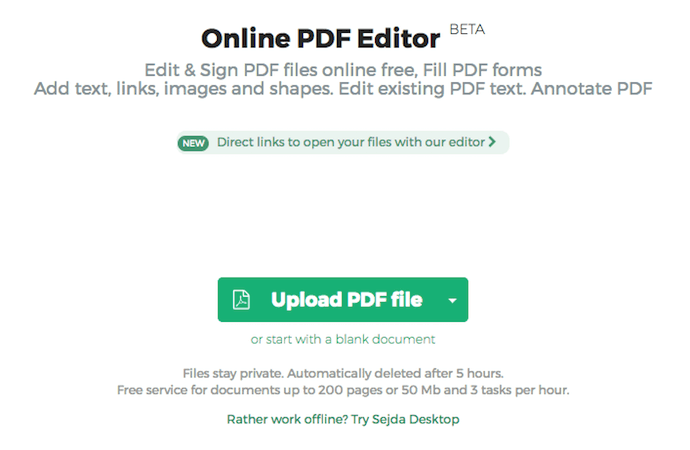
Online PDF editor software is a free tool allowing you to sign and edit PDF files on the web without incurring any cost. You can fill your PDF document or form and even add shapes, links, text, and images as desired, including annotating and editing existing links and text in PDF. Features are basic and useful if all you want is a simple PDF editing process.

Editing PDF Online

  1. Go to Sejda website (or any PDF online editor site).
  2. Upload the PDF you need to edit (or drag and drop it) into the website. One of the things you notice with online editing software such as Sejda is that uploads are done over encrypted connections in a private and safe process. After you’re through with editing, files are then deleted. They also come with desktop features allowing you to work on your documents on your PC. With cloud computing virtually inescapable, online PDF editing tools also include cloud compatibility features, such as Google Drive and Dropbox where you can pick your PDF documents from.
  3. Ensure your PDF file has been uploaded.
  4.  On the top menu choose the addition or edit type you need to complete. Ensure you’ve selected the Text tool at the toolbar on the top.
  5. Use mouse on the document to choose what to modify and edit as needed. The text that needs editing is what you click.
  6. For existing text modification in Sejda, choose Text on the toolbar and hoover cursor on the text you want to modify.
  7. Once done ensure all changes are saved and download the PDF as edited. Carry this out by clicking Apply Changes tab to ensure all the changes you’ve effected are applied. You can then go ahead and click Download to deliver the PDF with all the edits as you wanted them in your computer.

Sejda is free to use and good for short PDF modifications but doesn’t accept any PDF above 50MB. Sejda also deletes your edited PDFs after 5 hours. The features are also minimal with a basic content eraser and no OCR.

How to edit a PDF on Windows (Acrobat)

Acrobat PDF editor tool that works for windows is provided by two versions. One is Acrobat Standard DC for Windows only, guaranteeing reliable creation, signing and editing of PDF files and available from $12.99 per month or $155.88 per year. You’re also required to annually commit to pay for the tool and team licenses are also available.

The second version for both Windows and Mac users is Acrobat Pro DC, assuring complete PDF features and much more and begins from $14.99 per month or $179.88 per year. You’re also required to make annual commitments and team licenses are also available.

PDF Editing on Windows (with Acrobat)

  • Begin by running Adobe Acrobat on your computer. Ensure that you’ve downloaded Adobe Acrobat on your desktop or laptop before you begin the PDF editing process.
  • Click Open from File and choose the PDF document from the dialogue box. Opening a file inside Acrobat allows you to begin fast and easy.
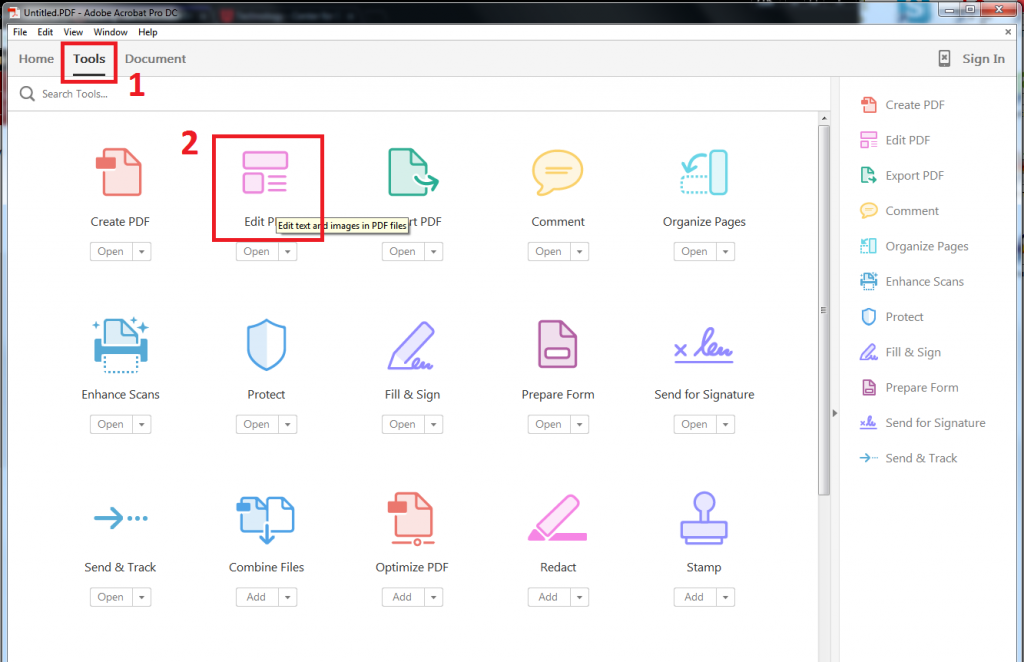
  • After opening your document choose Edit PDF from the toolbar. The Edit PDF tool for Acrobat is situated towards Tools option.

  • Edit text by placing cursor on the words you want to modify. Simply click either the image or text you need modified to continue. As you do this Acrobat guides you by showing the critical tools needed for this.
  • Use Format features from the toolbar on the right to edit the text. Right on the page you can edit or add text. Notice that paragraphs and lines will be reflowing automatically but it’s also possible to just drag and click resizing the elements.
  • Edit any image by positioning the cursor on it and use Objects features to change the image using options appearing under the text preferences. On the Objects list also are all selections you need to resize, move, replace or add images right within the page.
  • You can go ahead and edit the PDF document even further if you so desire. Simply click the Background tool, Watermark, Footers, and Headers or Link and continue.

Adobe Acrobat is a useful PDF editor but for more advanced modifications you must upgrade to more expensive versions, which include Acrobat DC Pro Perpetual available from $15 per month and $180 annually to $450.

How to Edit a PDF on a Mac (Preview)

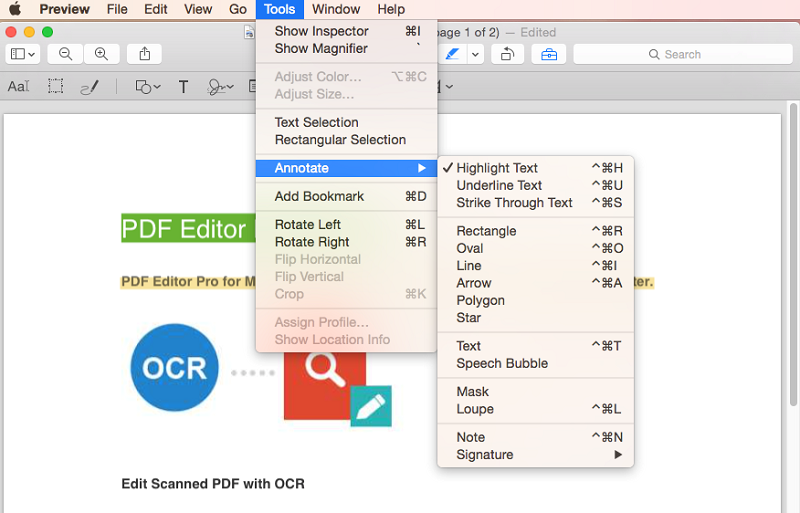
Preview is a MacOS inbuilt tool allowing you to modify PDF easily and fast. You can use it to strikethrough or underline text, highlight, rotate pages, remove or add pages, add arrows, text and shapes, comments and notes to your PDF documents. A signature can also be added though in an elaborate process and not the most flexible.

Editing a PDF on a Mac (Preview)

  • In Mac, simply open the PDF document to modify and it’ll automatically appear in Preview.
  • Click the edit icon (pencil-like) to have markup tools opened, such as text selection and rectangular selection tools to draw and sketch text and signs, do color fills, select text styles, shape style, notes to borders.
  • The Preview tools can then be used to add needed text, highlight and underline text and even draw into the PDF.

  • To add text you must have a text box. Create one if you’ve not in Preview by selecting Tools, choosing Annotate and Text within the Preview menu.
  • As a result, watch for a small box that should appear in the middle of the page and inside is the word Text (in red). You can then move the text box through a simple drag and drop anywhere across the PDF, including resizing it to agree with the page layout. Add the text you want by simply typing in the text box.
  • Do change the color, size or font of text if you so desire by clicking A icon (slanted), located towards the toolbar’s options on the far right. As a result, more standard formatting choices will come up allowing you to modify and change text including how you’d like it justified, for instance, justified right.
  • In case you need to move any text box on the page, simply click it and drag to wherever you want it.

Preview is an inbuilt way of editing PDF in your Mac. However, the process of copying texts, setting up and using text boxes, check-marking in PDF to adding comments, notes and signatures is cumbersome and require lots of elaborate steps. It also doesn’t offer advanced editing options and other PDF editing tools are a better choice, especially if you want to make your PDFs more professional, edit heavy PDFs and modify fast.

How to edit a PDF in Word

Unlike Macs, Windows don’t have inbuilt tools for image extraction and PDF editing. You need third-party tools to modify PDFs in any Windows computer.

Editing PDF in Word

  1. To edit PDF in Windows Office’s Word, you must first download the PDF software such as PDFelement or Acrobat.
  2. Once the download is complete open the PDF viewer tool.
  3. Go to File and click Open or equivalent in the software of choice and choose the PDF document you want to modify from the dialogue window that opens.
  4. After opening the file go ahead and export the PDF using Export icon on the toolbar.
  5. Choose Microsoft Word as the destination of the export and complete the exercise.
  6. Do go ahead and open the exported document in Word and edit the text and images as required using Word features and options. Save the document once done.
  7. On File Format select PDF clicking Save to convert it back to PDF.

Editing PDF from Word might be popular but as you might have already figured out there’re better tools of doing this without actually moving from PDF to Word, which offer extra highly advanced features to modify your PDF texts and images and make your PDFs more professional.

Understanding what a Crypto Calculator is

Trading in cryptocurrencies is slowly but surely gaining traction. While forex trading is still dominating, the higher percentage of individuals and also countries that are embracing and welcoming digital currencies means that more and more people will join the cryptocurrency trading bandwagon. Anyone looking to join the cryptocurrency trading bandwagon will most definitely come across these two words ‘crypto calculator’ in his/her early days.

A crypto calculator is a useful tool for crypto investors and traders. There are a multiplicity of reasons why a crypto calculator is such an important tool. These include the ability of the crypto calculator to support almost all digital currencies in circulation, its ability to work in real time and also the fact that it comes free. Armed with this knowledge on the benefits of a crypto calculator, lets now delve deeper into understanding what a crypto calculator is and how it improves the prospects of a cryptocurrency investor or trader.

How the Crypto Calculator works

A crypto calculator is an online tool which a crypto investor or trader can use to check for and determine the actual value of any digital currency at any given moment. Because the crypto calculator works in real time, it’s very much guaranteed that all information released by the calculator will work to the benefit of the trader or investor.

To use the crypto calculator, an investor or trader must be looking at trading different digital currencies. Therefore, the process is twofold.

First, the investor or trader has to select the first digital currency that s/he wants to see the value of. One can make use of the drop-down list which comes with many cryptocurrencies or alternatively, s/he can type the name of the digital currency s/he is looking for. Once done, the next step is to type in the value of the cryptocurrency that s/he wants to convert. In practice, this means after selecting for instance Bitcoin, the next step is to decide if you want the value of 1 Bitcoin, 5 Bitcoin or 10 Bitcoin. Once everything is set, the next step is to check the opposite box i.e. the fiat currency box. Most crypto calculators come with the US Dollar as the default fiat currency. If one is satisfied with the default, then the next step is to press the check button to see the results. Investors or traders can also change the fiat currency from the default (US Dollar) to any other supported fiat currency. Other fiat currencies that are supported on most crypto calculators include the Australian Dollar, EUR and the British Sterling Pound.

The second step is more or less a repeat of the above. This time,however, the investor or trader will be checking for the value in conventional currency of a different cryptocurrency. Once the investor or trader finishes checking for the value of the second cryptocurrency, the next step is to compare the values of the two digital currencies in conventional currency form and decide if they should trade the two or not.

How To Recover Deleted Data on iPhone

There are several occasions when you may need to recover data lost from your iPhone, such as following a jailbreak, the accidental deletion of photos or videos, for an update of the operating system, etc. No matter what the cause, this program will help you easily recover lost data.

If you have deleted data accidentally or lost data after an iOS or jailbreak update, don’t worry you can try to recover them quickly and easily. iMyFone D-Back is amazing program to recover deleted data  on iPhone, including photos, SMS, notes, recent calls, chat WhatsApp, application data (Instagram, Flickr, iPhoto, iMovie, Kindle) and other files from iPhone.

Recover lost or deleted iPhone, iPad, iPod touch data with iMyFone D-Back iPhone Data Recovery, easy and it provides different ways of data recovery and fix various iOS issues without data loss.

First of all, download and install this iMyFone D-Back iPhone Data Recovery for PC and Mac, and then just follow the steps below, you got 3 different options and we have cover all of them …

Option 1: Recover data from iPhone

With this mode you can recover deleted files on iPhone even without a backup file.

Step 1 – Connect iPhone to PC and choose direct recovery mode

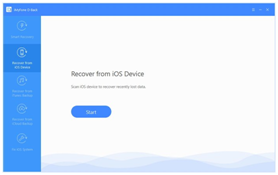
Connect your iPhone to the PC via USB. Launch iMyFone D-Back go to option “Restore from iOS device” and click on “start”.

Step 2 – Start iPhone scan

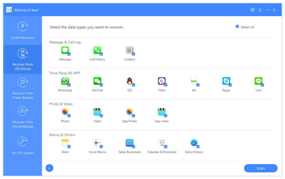
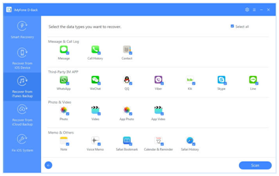
Choose the data you want to search in the memory of the iPhone and then click on the button on the bottom right to start scanning the memory of the device.

Step 3 – Preview contacts, text messages, chats, notes, photos, etc.

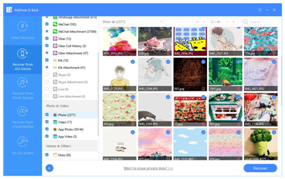
After scanning the software will show all the data found divided into different folders: Messages, Photos, Contacts, WhatsApp, Notes, Calendar, Camera Roll, SMS Attachments, Bookmark Safari, Memo Vocal, Reminder, etc …

Click on one of these folders on the left to preview the detail of the recoverable files.

Step 5 – Recovery iPhone data

Select the files you want to recover and click on “Recover”. Then specify a folder on your PC where you can save these files.

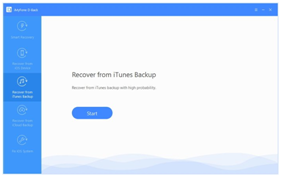
Option 2: Recover data from iTunes Backup

Have you recently made a backup of your iPhone with iTunes? In this case you can use iMyFone D-Back to recover data from that backup.

The backup file generated by iTunes not easily managed with the usual text editor programs. You need iMyFone D-Back to view and extract data from this backup.

Step 1 – Select recovery mode and choose backup to analyze

Launch iMyFone D-Back and select the option “Recover from iTunes Backup”.

The program will automatically find the iTunes backup files on your PC. Choose the one to analyze and click on “Scan” to proceed.

Step 2 – Preview recoverable files

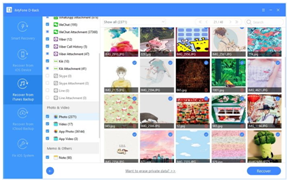
After scanning all files will be previewed from the central screen of the program.

Step 3 – Extract files from iTunes backup

Choose the files you need (photos, messages, contacts, notes, etc.) and click on “Recover” to save them on your PC.

In the end, iMyFone D-Back is a very powerful software that supports multiple iOS devices. You can use this program both on Windows and Mac computers. iMyFone D-Back is designed to recover files from iPhone, iPod Touch and iPad, and also fix many iOS issues within few clicks.

4 Reasons to Choose Composite Doors

Many homeowners often struggle with the dilemma of choosing an appropriate door for their respective homes. It’s not surprising, given the fact that there are not only a staggering number of options available on the market, they can also come with high price tags as well. Maintenance and longevity also have to be considered to get the most out of the investment, but it also has to be visually appealing and fit the overall design of the home too.

Fortunately, there’s a better alternative to the more conventional wooden or steel doors, and these come in the form of composite doors. Their rise in popularity is not without precedent; composite door suppliers, Truedor among others, have become the standard today thanks in no small part to the multitude of advantages that composite doors yield. Here are a few reasons to choose composite doors.

  • Composite doors are durable

Composite doors are made of a variety of different materials, from glass-reinforced plastic to wood and insulated foam, for the purpose of being able to not just withstand the elements but also provide longevity. This multi-layered approach to their composition makes it much more durable than its counterparts and can be used in different environments without suffering from immediate deterioration that other doors would.

  • Improves thermal comfort

Apart from their durability, another result of their multi-layered composition is the fact that composite doors can keep the undesirable weather at bay and be maintaining thermal comfort inside. This can be especially important in locations with consistently cold climates. Because it allows the warmth to stay indoors, homeowners are less likely to incur high expenditure on their monthly bills on keeping the heating systems on all the time.

  • Longevity

One of the best qualities that composite doors have over their counterparts is their longevity. Because doors aren’t exactly cheap, it’s never a good idea to have them replaced constantly. Add to the fact that it doesn’t require as much maintenance as doors made from other materials, it gives you peace of mind that its longevity won’t be compromised.

  • Easy maintenance

Having a more traditional wooden door can be difficult to maintain. In fact, you’ll be hard-pressed to keep it in perfect condition after just a few months without investing a significant time and effort into maintaining it. Composite doors, on the other hand, pose no such issues. With no more than a piece of cloth and some soapy water, they’re easy to keep in pristine shape.

With all of the benefits that composite doors offer homeowners, they’re great value for money. This is especially true since they’re reasonably affordable to own. With all of the advantages that come, there’s almost no reason to purchase other alternatives. Best of all, they’re easy to find and procure. They are so versatile in design that you’ll be hard-pressed not to find exactly the aesthetic look that your home needs and will undoubtedly go a long way in boosting the value of your property in the process.

Image: Pixabay.com

3 Easy Ways to Minimise Expenditure in Business Operations

Regardless of the industry or size of the business, having a successful company requires the ability to properly manage resources. No matter how profitable an endeavour might be, the financial gain can just as easily diminish if the numbers are left unchecked. While there are certain elements that you cannot necessarily skimp on, there are other areas that can potentially be much more cost-effective than they currently are. Office supplies are an easy cost to cut, especially when you buy in bulk. Staple office supplies have a long shelf life and if you have enough storage space, hand sanitiser bulk buying is worth the savings, the same goes for stationary, paper and even kitchen supplies like coffee. To this end, here are three bigger ways to minimise expenditure in your business.

1. Find utility providers that offer better deals and rates

Utilities such as electricity, water and gas are daily necessities that no business can be without. However, with the less than predictable fluctuations of coal and oil as well as the ever-changing market conditions, monthly expenses can potentially put a dent in the budget and leave very little profit gain as a result. Not unlike any other industry, however, there are always better options available. In fact, you can quite easily switch business gas suppliers or electricity providers if the need presents itself.

All that the task requires is a small investment of your time and a reasonably modest budget to acquire the services of the consultants and brokers in the industry. These specialists will be able to provide you with all the information that you’ll need as well as feasible options that are available in your location.

2. Be more energy efficient

Despite the leaps in technological advancement with energy-efficiency, you’ll be surprised at how many businesses continue to use last-generation technology to this day. Despite how functional these may still be, modern variants don’t just exist to offer more features to their users but to ensure the energy consumption is kept at an absolute minimum too. Since this approach can entail a significant investment, try to start small with perhaps replacing the lights with LED variants and work your way up from there. It will save you money in the long run.

3. Cut down on outsourcing services

There’s no denying that shouldering all of the workload can put significant stress on any business, and to this end, outsourcing can prove to be a viable solution. However, not everything should be outsourced to another company. Marketing or advertising elements, just for example, can just as easily be done within the business through the use of modern technology. It’s important to know which tasks should be delegated to outside experts and what jobs can be done within the company.

It’s easy to overlook the details when running a company. There are a lot of areas that will require the attention of the business owner after all. But investing time into making sure that no stone is left unturned when cutting down on expenditure or minimising operation costs can pay dividends. You’ll not only be keeping your profit margins as high as possible, but you’ll give yourself enough breathing room to make financial investments in areas that can potentially yield more growth and success for your business.

Image: Pixabay.com

Key Digital Tools You Should Become Competent With

Whatever your career, the ubiquity of the digital world in the modern era has meant that getting on top of trends and tools means getting ahead in the workplace. Be it in a fledgling company or a large business, utilizing the world of digital media and the tools that they provide means understanding a new landscape of business that’s both super-fast and incredibly efficient. This article takes a look at some of the most important digital tools that have become deeply important for anyone aspiring to build attractive skills for employers.

Excel 

The digital spreadsheet is practically synonymous with business, helping as it does with everything from ordering data to making financial documents. Even on a personal level, managing one’s budget, some well brushed-up Excel skills can be incredibly useful where once the pen and paper were king. When applying for jobs, you’ll have noticed that a working knowledge of Excel is stipulated as essential – it’s an every-day part of many office jobs – so getting schooled on the sum tool and other useful shortcuts will certainly make you a more desirable and competent worker in their eyes.

Marketing 

Digital marketing has sky-rocketed into a huge industry over the past two decades, replacing older forms of marketing with fresh new ideas for connecting companies with their consumers and clients. There’s plenty to learn in this domain, whether it be the Google Analytics that can help optimize a company’s position in search results, or the use of the email finder to find and target the right email addresses with content, information or offers from your business to relevant parties. Scrub up on digital marketing techniques, and you’ll make yourself a more attractive prospect for the companies you apply to work for.

Web Design 

The world of code that holds computers and the internet together can seem utterly impenetrable, and is for many people, but that’s not to say that you shouldn’t find your level of involvement in the web design industry – even if that’s simply a case of getting to know some of the website hosts such as WordPress, who’ll sort out all the code for you so that you can simply work on creating a professional-looking website without the hard labor of writing code. Even the most basic web design skills are valued by smaller companies looking for a fresh pair of eyes to improve their site.

Communications 

Whether it’s emails, Skype or social media communications, the digital world entails a new, ultra-fast and wonderfully efficient way of getting in touch with clients, coworkers, and customers. While you may believe you’re an aficionado of all digital communications, perhaps using email and social media daily, the trick to the most effective communications in the digital age is to know how exactly to maximize your voice through strategic methods; look up online how to become a master of digital communications so that you’re an efficient, effective worker in whatever job you choose.

These digital tools will help you get ahead in the workplace, should you spend the time to perfect your handling of them.

Essay: How To Succeed

An essay is one of the most popular pieces of writing students have to do at the college/university. Such a task often causes difficulties because it’s not that simple to provide insights, especially when you have conservative professors that can be quite harsh when it comes to grading.

Students have to reveal their creative potential, show their skills and gained knowledge when writing an essay. An only paper written under the plan and meeting all requirement will really impress a professor and make it possible for student to get A+. That’s why so many student google who is able to write an essay for me quickly? It’s not hard for get a paper written for you anymore; now you can easily apply for help to an advanced writing service, and get a unique paper written by real experts within a short amount of time. Ordering an essay, you not just get the highest grade, but also learn to formulate thoughts and write such a complicated assignment properly. 

Why Essay Matters

An essay is a small, but really complicated task which helps professors evaluate students’ performance. Such kind of an assignment is intended to show off student’s skills, opinion on one or another issue and whether he or she is able to develop an argument. Essay is a perfect way to revel student’s creative thinking and an ability to express a thought.

It’s not that easy to put all the ideas and thoughts in writing, and truly make your paper stand out from the others. In this regard you require:

  • a good vocabulary size, an ability to formulate thoughts properly;
  • an ability to construct a narrative;
  • a need to analyze information and express your opinion.

Essay is the perfect way to check students’ understanding on one or another issue. It is a work which has to cover the topic fully and be anywhere from fiction to science.

Ways To Write An Unforgettable Essay

The basic rules of writing an essay are simple, however it is often hard for students to follow them. Let’s consider some aspects which help you make such kind of a task successful. Both introduction and conclusion have to focus reader’s attention on the subject of matter; an introduction should provide insight into the issue at hand, while a conclusion has to reveal author’s own opinion. It is also necessary to highlight paragraphs which are logically connected.

An assignment is only successful when its aim is reached. It is worth paying attention to a narrative style: your essay has to be emotional, differ with artistic skill and fresh thinking. Short, simple sentences will help you convey your thought to the audience properly.

If You Face Any Difficulties 

Undoubtedly, it is not that simple to write a qualitative essay due to a variety of reasons. What should you do if you need to present a perfectly written paper, however, you are not good in writing assignment of certain discipline? Don’t fall into despair if you are not able to meet the deadline, write a paper on one or another topic, or lack time. Surely, it is hard to write such a complicated assignment with no writing skills or practice. It’s no secret essay requires certain knowledge of how to properly express ideas, which causes difficulties for a great number of students. So what should you do in order to get a perfectly written paper on time?

Professional writing companies will help you at such a difficult situation. Now you are able to easily apply for help to experienced authors who are engaged in writing assignments for a long time, and are able to write a unique high quality work on any discipline, starting from biology and ending with astronomy. Ordering a paper online, you specify all your needs and requirements which will be considered by the service, such a way you will not only get a non-plagiarized work, but also a paper done under your plan.

You don’t have to be worried about the deadline applying for help to an experienced writing company. No more stress, troubles and difficulties; enjoy your pastime while your paper is being written for you by a team of keen specialists. Be sure, you will easily show yourself from the best side and leave a deep impression on the audience presenting an essay you have ordered online!